


Home Office Charging Station: Complete Desk Setup Guide

A clean, organized desk layout directly supports a productive and professional workday at home. When you spend your morning hunting for power cords or unplugging one device to charge another, you lose valuable creative momentum. Integrating a dedicated charging station into your workspace resolves this daily friction and keeps your focus where it belongs.
A home office charging station is a dedicated workspace accessory that consolidates power cords and streamlines charging for multiple devices into a single unit. It organizes your desktop by replacing several separate chargers and cords with one central power source. This positive organization reduces visual noise and keeps essential devices like phones, watches, and headphones powered in one designated area. According to a study on workspace ergonomics by the University of Iowa, optimizing the relationship between a worker and their workspace increases daily productivity and enhances overall well-being. By centralizing power, a desktop charging hub keeps your tools charged, within reach, and ready for use without distracting cords.
Ready to simplify your desk? Browse premium wireless charging stations for your home office and find the perfect fit for your workspace.
Home Office Charging Station: Why Your Home Office Desk Needs a Dedicated Charging Station
A dedicated home office charging station transforms how you interact with your desk every day. When you use multiple Apple devices to manage your tasks, keeping them powered can become a chore. A premium work from home charging setup guide shows how a single hub keeps your desk clean. A home office charging station on your desktop ensures your tools are always ready when you need them. It turns your workspace into an organized zone that supports your daily workflow.
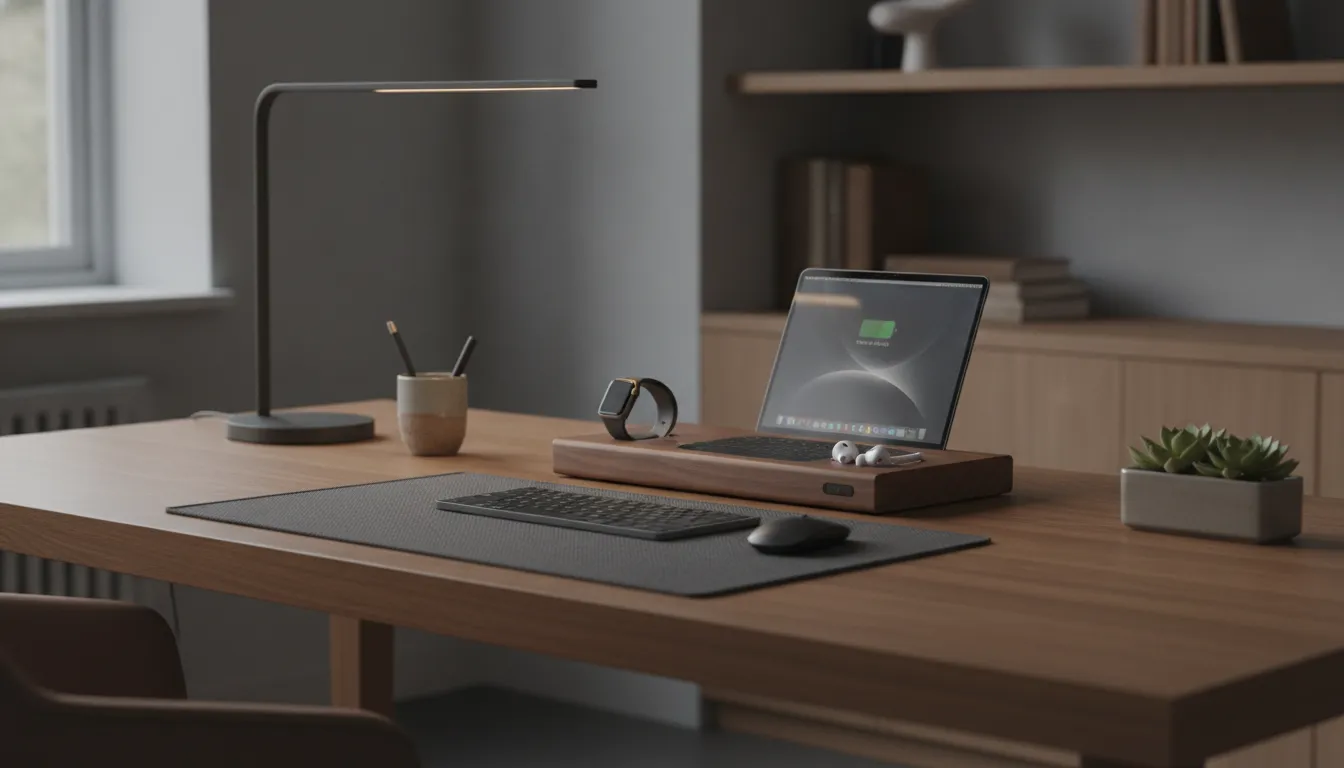
Organizing Your Desktop Space
Each extra cord on your desk adds visual noise. When you run separate lines for your phone, watch, and tablet, you lose valuable workspace. Combining these paths into one dock creates a tidy area that helps you stay on track. Using a single home office charging station reduces cord count and streamlines your workflow. This clean style lets you focus on your work instead of managing cords.
Ergonomic Benefits and Posture
A smart desk layout helps you maintain good posture while you work. Ergonomic studies show that keeping your body in a neutral position with your elbows at a 90-degree angle reduces physical strain, as noted by the University of Pennsylvania Environmental Health and Radiation Safety department. Your hands should reach your devices naturally without stretching. A central charging hub lets you place your phone and other tools in predictable spots. This placement prevents awkward reaching and keeps your workspace safe and comfortable.
Boosting Daily Output
An organized workspace does more than just look nice. Making adjustments to your workspace to fit your daily needs leads to higher productivity and better well-being, according to research from the University of Iowa Occupational Safety program. A dedicated charging spot removes the daily stress of searching for low battery warnings. It keeps your phone, watch, and headphones fully powered in one place. Your devices stay ready for calls and tasks, which helps you maintain your focus all day long.
How Do You Plan Desk Zones for Maximum Efficiency?
Planning your desk zones starts with understanding how you interact with your workspace. A well-planned desk layout directly improves how you work. Grouping your tools by task helps reduce distraction and keeps your workflow smooth. An organized setup also supports physical comfort. When you optimize how you interact with your workspace, you can expect a more productive day and better overall well-being, as shown in studies by the University of Iowa.
The Four Elements of Workspace Setup
A smart desk design starts with how your body connects to your tools. You can apply the four elements of workspace setup to guide your layout. First, align your screen for natural head and eye interaction. Second, position your hands comfortably relative to the devices you use. Third, adjust your chair to support your body. Fourth, keep your feet flat on the floor.
Applying these elements ensures you place your tools where they are easiest to reach. By arranging your key devices within your primary reach zone, you reduce physical strain. Placing a dedicated home office charging setup in this zone keeps your essential devices powered and within sight without requiring you to stretch or lean forward.
Five Steps to Map Your Workspace
- Map your devices. Identify the primary and secondary tools you use every day. Group your phone, watch, and tablet based on how often you interact with them during work.
- Choose the hub position. Place your primary multi-device home office charging station where it is easy to reach but out of your main writing or typing area. A corner or rear-desk position works best.
- Plan cable paths. Run power cords straight to the back or sides of your desk. Grouping your cables along these set paths prevents them from crossing your active work surface.
- Place your charging station. Set up your magnetic docks or wireless trays on the designated hub position. Ensure the power cable runs directly off the edge of the desk to a surge protector.
- Test and adjust. Sit in your chair and reach for your phone, watch, and keyboard. Adjust the position of your charging hub until you can access every device while maintaining a neutral, comfortable posture.
What to Look For in a Desk Wireless Charging Station
Not all charging stations are built for the same desk setup. Selecting the best multi-device home office charging station is a simple way to organize your workspace. The modern desk setup relies on clear spatial zones, and your power hub is the anchor of the utility zone. Upgrading from legacy plastic pads to an integrated MagSafe station reduces visual noise while keeping your essential tools ready. High-quality materials like handcrafted wood and full-grain leather also help make your desk a more pleasant place to work.
Match Your Station to Your Devices
Your power needs depend on the number of devices you use daily. To plan your desk layout, first list your essential tools. For example, a standard setup might include a phone, wireless earbuds, and a smartwatch. A multi-device charging dock should match this list to keep your desk clean. When you select a dock with the exact number of chargers you need, you avoid extra cords and empty ports. This keeps your physical workspace minimal and efficient.
The Benefits of Premium Materials
A premium dock does more than just supply power. Solid wood bases made from oak, midnight black, or rustic white wood add warmth to your desk. These natural materials help lower stress and improve focus during long work hours, as noted in studies on workspace design from the University of Iowa. Combining real wood with full-grain leather creates a soft surface that protects your devices from scratches. This design-led approach turns a basic desk utility into a key part of your home decor.
| Model | Device Count | Best Use Case |
|---|---|---|
| QUAD TRAY | Up to 4 devices | Power users with phone, watch, earbuds, and tablet or USB-C device |
| TRIO | Up to 3 devices | Standard setup for phone, watch, and wireless earbuds |
| DUO TRAY | Up to 2 devices | Minimal desk layouts for phone and wireless earbuds |
No matter which model you choose, a dedicated dock helps you maintain a clean work setup. By keeping your devices in fixed charging zones, you build a routine that supports daily focus.
How Can You Match Your Charging Station to Your Desk Aesthetic?
Your charging station should complement your workspace design as much as it powers your devices. A functional workspace should look as good as it performs. Selecting a home office charging station that complements your room's style is an important part of creating a cohesive environment. Premium accessories sit at the intersection of wireless charging and home decor, serving as functional design pieces rather than utility items.
Selecting the Right Wood Finish
The foundation of a cohesive desk setup starts with the materials you choose. Handcrafted wood adds a natural warmth that plastic accessories cannot replicate. For a traditional space with rich tones, dark walnut or oak bases blend seamlessly with heavy wood surfaces. If you prefer a modern style, a sleek midnight black finish pairs well with dark matte desk mats and metal frames. For those who favor a bright Scandinavian look, a rustic white finish on a light maple or white desk creates a clean and airy feel.
Choosing Leather Accents
Leather details bring a tactile quality to your desktop layout. Selecting the right leather finish can unify your other daily tools like your laptop sleeve, notebook, or desk pad. Top-grain leather tops in classic black, clean white, or warm saddle brown offer a soft resting spot for your hardware. You can pair a black leather finish with space gray devices for a uniform look. Or use warm saddle leather to add contrast to a neutral white desk surface.
Quiet Luxury with Minimal Branding
True premium design does not need to shout. To maintain a clean visual environment, look for a multi-device home office charging station that avoids flashy logos or bright status lights. Charging bases crafted from solid wood and leather emphasize quality through their physical weight and texture. High-grade materials speak for themselves, which allows your power hub to sit quietly on your desk as a natural extension of your furniture.
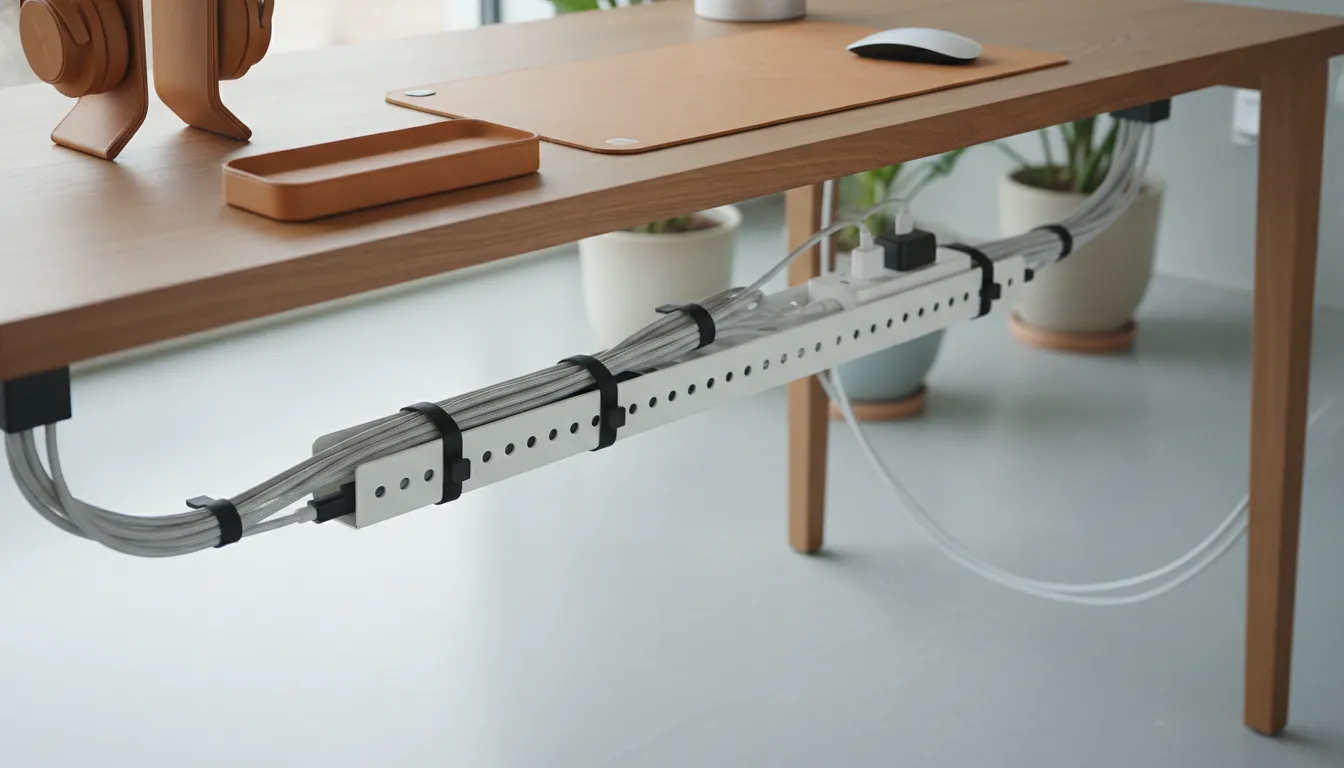
How Do You Organize Cables and Reduce Visual Noise?
Effective cable management is the difference between a chaotic desk and a calm workspace. A clean desk helps you think clearly and work with fewer distractions. Studies from institutions like the University of Iowa show that optimizing your workspace can reduce physical stress while increasing overall productivity.
Streamlining with a Central Hub
Using a home office charging station lets you replace multiple power bricks and cords with a single, elegant unit. Instead of running three or four separate cables across your desk, you run just one cord from your station to the wall. This instantly lowers visual noise and keeps your Apple devices in one designated spot. For extra organization, you can pair your setup with premium leather accessories that keep other small items in place.
Smart Cable Routing Techniques
To keep your workspace clean, route your main power cord behind your desk or along a desk leg. You can use small adhesive cable clips or hook-and-loop straps to guide the wire out of sight. Keeping the cord tight against the furniture prevents it from hanging loose. This simple step ensures that your charging hub remains the only visible tech element on your surface.
Built-In Safety for Peace of Mind
Premium wireless chargers do more than just organize your desk. Quality devices include advanced safety systems such as overheating protection and foreign object detection. This technology monitors the charging surface and stops power flow if it detects metal objects or high temperatures. These features let you place your charging station near other office tools without any safety concerns.
Maintaining Your Charging Station and Desk Setup
Proper maintenance keeps your premium charging station performing at its best for years. A premium home office charging station is more than a tool. It is an investment in your daily productivity. Protecting this setup keeps your work environment clean, quiet, and efficient. Proper care also ensures your devices charge safely every day.
Protecting Real Wood and Leather Surfaces
Our stations are made from solid wood and full-grain leather. These premium materials need gentle care to preserve their natural beauty over time.
- Dust the wood with a soft cloth. Use a dry microfiber cloth to wipe the wood base. Avoid water and harsh household spray cleaners, which can ruin the wood finish.
- Clean leather with a dry cloth. Gently wipe the leather surface to remove dust or oil. Do not use chemical leather cleaners, soaps, or liquids. These can stain or dry out the full-grain leather.
- Keep the station away from direct sunlight. Strong UV rays can fade the natural color of both wood and leather. Place your home office charging setup away from open windows.
- Insert cables with care to prevent wear. When plugging in power cords or using the built-in ports, hold the plug straight. This prevents damage to the inner charging ports over time.
Ensuring Safe and Long-Lasting Power
Keeping your charging setup clean is also a matter of safety. Dust or metal objects on wireless pads can trigger foreign object detection, which pauses charging to protect your hardware. A clean, dust-free station ensures a steady flow of power to your Apple devices. If any issues arise, NYTSTND backs your purchase with a one-year limited warranty to guarantee long-term quality and performance.
Frequently Asked Questions
Can a wireless charging station charge a phone with a case?
Yes, most premium charging stations can power phones through cases. NYTSTND chargers work with standard phone cases up to 5 millimeters thick. Make sure the case does not use metal, magnets, or credit cards on the back. Heavy metal cases can block the signal and stop charging.
Do wireless charging stations hurt phone battery life?
No, quality wireless stations do not harm your battery. Modern chargers use smart chips to control heat and stop charging when your device is full. According to the University of Pennsylvania, proper thermal control is key. Premium units include safety features to prevent overheating and keep your battery healthy.
What is the difference between MagSafe and standard wireless charging?
MagSafe is a premium upgrade over standard wireless charging. Standard Qi chargers require you to line up your phone manually on a flat plastic pad. MagSafe uses built-in magnets to snap your phone into the exact spot for optimal power. This secure link enables fast charging up to 15 watts and reduces desk clutter.
How many devices can a home office charging station power?
A desktop charging station can power between one and four devices at the same time. Compact models power a single phone, while larger docks charge up to four Apple devices, like your phone, watch, headphones, and tablet. These multi-device stations help clean up your desk by running everything off a single cord.
Ready to Simplify Your Desk Setup?
Working at a desk full of tangled cords and loose power bricks makes it hard to focus. Every minute you spend hunting for the right cable or waiting for a dead battery to charge is time taken away from your most important work. Upgrading to a dedicated desk charging hub is the easiest way to regain control, reduce visual noise, and keep your daily tools powered and ready to use.
Ready to upgrade your home office setup? Explore the NYTSTND collection of premium wireless charging stations to find the perfect handcrafted charging dock for your workspace today.


