


Best iPhone MagSafe Charging Stands and Stations
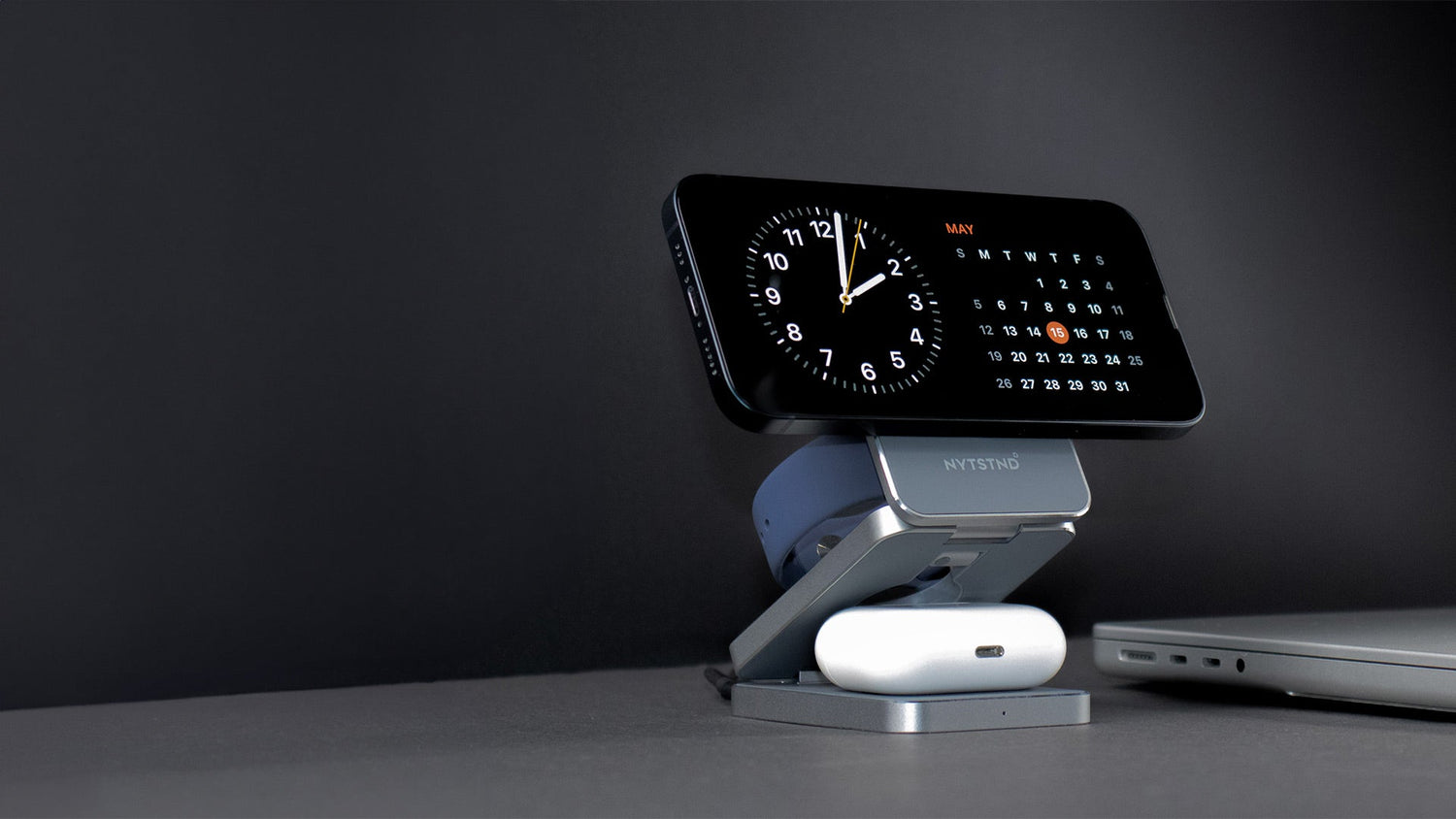
The best iPhone charging station should give your everyday devices a considered place to land without making your desk or nightstand look like a collection of cables. Our pick for a design-led, multi-device setup is the NYTSTND QUAD TRAY Black; if you want your iPhone held upright for viewing, the Satechi, Belkin and Anker options below offer different stand arrangements.
This roundup compares the named MagSafe charging stands and stations by phone position, supported devices and charging arrangement. A magnetic tray can organize more of your daily carry, but it should not be mistaken for an upright iPhone display.
Key takeaways
- The best iPhone charging station depends on whether you want upright phone viewing or one organized place for several devices.
- NYTSTND’s QUAD TRAY Black/Oak combines magnetic iPhone charging, an integrated Apple Watch charger and a wired USB-C connection for an iPad in a wood-and-leather tray.
- A magnetic attachment does not, by itself, establish a charger’s certification or the power an iPhone will receive.
- For Apple’s MagSafe Charger, peak wireless charging power varies by iPhone model, charger version, power adapter and conditions.
Which iPhone MagSafe charging stand fits your setup?
The best MagSafe stand for your setup is the one that accommodates your daily devices in the position you actually want to use. An upright phone mount makes the screen easier to see; a charging tray brings a phone and other essentials together without promising upright iPhone viewing.
| Named pick | Phone position | Charging arrangement | Distinctive fit |
|---|---|---|---|
| NYTSTND QUAD TRAY Black/Oak | Magnetic charging pad | Two wireless pads, integrated Apple Watch charger, USB-C and USB-A outputs | Larger wood-and-leather tray with an arrangement for up to five devices |
| NYTSTND TRIO station | Charging pad | Two wireless charging points, USB-C and USB-A outputs | One place for the everyday Apple trio |
| Satechi Aluminum 2-in-1 Magnetic Wireless Charging Stand, ST-WMCS2M | Upright magnetic attachment | iPhone mount and AirPods charging pad | Phone viewing beside an earbuds case |
| Belkin BoostCharge Pro Convertible Magnetic Wireless Charging Stand, WIA008 | Adjustable stand or flat pad | Magnetic phone charging and compatible wireless-earbuds use | Convertible phone viewing |
| Anker MagGo Wireless Charging Station, Foldable 3-in-1, A2557 | Adjustable, foldable phone mount | Phone, Apple Watch and wireless-charging earbuds case | Three-device travel arrangement |
| NYTSTND DUO TRAY Black | Wireless charging surface | Dual wireless surface plus rear USB-C and USB-A ports | Phone and earbuds, or two phones, in a smaller tray setup |
The table separates physical position from electrical capability: a magnetic pad attaches a compatible phone but does not necessarily hold its screen upright. For a calmer fixed setup, start with the devices you leave on the nightstand; for frequent travel, consider how the stand folds and what must accompany it.
What does MagSafe attachment change for an iPhone charging stand?
MagSafe is Apple’s magnetic wireless-charging system, which aligns a compatible iPhone with its charger. Magnetic attachment helps position the phone on a matching charging surface; it does not, on its own, tell you whether a station holds the phone upright or what charging power the phone will receive. See our MagSafe and Qi comparison for a fuller explanation.
How is magnetic attachment different from Qi2?
Qi2 is a wireless-charging standard whose magnetic attachment profile aligns devices and chargers. The Wireless Power Consortium’s Qi guidance distinguishes Qi2’s 15W profile from Qi2 25W and explains that Qi certification involves independent testing. A product’s magnetic alignment or advertised wireless output should not be read as proof of a particular certification.
Which iPhones work with magnetic charging?
Apple lists the iPhone 12 family and later supported MagSafe models for magnetic charging, while Qi-compatible models such as iPhone 11 can charge on a compatible surface without the same built-in magnetic attachment. Apple also identifies exceptions among newer phones, so check your particular model rather than assuming every recent iPhone attaches magnetically. Apple’s MagSafe Charger compatibility guidance sets out the model distinctions.
When does an upright stand matter?
An upright mount is useful when you want to see your iPhone screen while it charges. Apple’s StandBy instructions call for a charging iPhone set on its side and kept stationary; an adjustable upright mount can make that arrangement practical. Our QUAD charging stations serve a different purpose: bringing several devices into one organized space.
How should you compare the best MagSafe charger stands?
Compare the phone’s position first, then count the charging positions you will use every day. After that, check whether a wireless earbuds case, an Apple Watch charger, a wired tablet connection and the required power equipment are part of the particular setup—not merely part of the brand’s wider range.
Which layout suits the space?
For a desk where you glance at your phone, an upright or convertible mount has a clear advantage over a flat pad. For a bedside table where the goal is to gather devices, keys and a wallet, our wood-and-leather QUAD TRAY Black/Oak offers a charging station and an organizer in one place. You can explore our charging range if a different footprint better suits your space.
How many devices need their own charging place?
An iPhone and a compatible wireless earbuds case call for a different arrangement than an iPhone, Apple Watch, earbuds and iPad. Our 3-in-1 TRIO stations have two wireless charging points and USB-C and USB-A outputs; QUAD TRAY Black distinguishes itself with a larger tray and an arrangement for up to five devices at once. An earbuds case must itself support wireless charging to use a wireless pad.
What should you check beyond device count?
Look at the exact phone mount or pad, how a case affects attachment, and the power supply intended for that model. The Wireless Power Consortium explains that certification tests safety and interoperability; do not substitute a general claim about magnetic charging for the certification of a specific charger. Our MagSafe-compatible charger range offers additional layouts, while our bedside charging approach explains the appeal of keeping a charging area organized.
What are our top picks for iPhone MagSafe charging stands?
Our picks cover three layouts: NYTSTND’s charging trays gather devices in one place, Satechi and Belkin offer upright phone viewing, and Anker folds for travel. Start with where you want your iPhone screen, then consider which other devices need a charging position. You can also browse our MagSafe wireless chargers to compare layouts across our range.
Best design-led multi-device station: NYTSTND QUAD TRAY Black
- Who it suits: You want a fixed desk or bedside station for an iPhone, Apple Watch, earbuds and a wired iPad.
- Key features: Our wood-and-full-grain-leather tray has two MagSafe-aligned wireless pads, an integrated Apple Watch charger, a USB-C port and a rear USB-A port. The outputs can power up to five devices at once.
- Practical limitation: The iPhone rests on a pad rather than standing upright, and the iPad needs a USB-C cable.
For that multi-device arrangement, explore the QUAD TRAY Black.
Best for the everyday Apple trio: NYTSTND TRIO
- Who it suits: You regularly charge an iPhone, Apple Watch and AirPods with a wireless-charging case in one place.
- Key features: Our TRIO collection brings those three everyday devices together in a charging-pad layout.
- Practical limitation: If you also want a dedicated wired iPad connection as part of a larger multi-device arrangement, QUAD TRAY is the better fit.
Best fixed upright phone-and-earbuds stand: Satechi Aluminum 2-in-1
- Who it suits: You want to see your iPhone screen at your desk while charging AirPods nearby.
- Key features: The Satechi Aluminum 2-in-1 Magnetic Wireless Charging Stand, model ST-WMCS2M, holds a compatible iPhone upright and has a separate wireless pad for AirPods.
- Practical limitation: Its phone-and-earbuds arrangement does not gather an Apple Watch and wired iPad into the same setup as QUAD TRAY.
Best convertible single-phone stand: Belkin BoostCharge Pro WIA008
- Who it suits: You want one phone charger that can lie flat or tilt up for screen viewing.
- Key features: The Belkin BoostCharge Pro Convertible Magnetic Wireless Charging Stand, model WIA008, switches between pad and stand modes and supports Qi2 magnetic charging up to 15W for compatible devices.
- Practical limitation: Its appeal is the convertible phone position, not a built-in multi-device arrangement like QUAD TRAY.
Best foldable three-device stand: Anker MagGo A2557
- Who it suits: You travel with an iPhone, Apple Watch and wireless-charging earbuds and want an angled phone view.
- Key features: The Anker MagGo Wireless Charging Station (Foldable 3-in-1), model A2557, combines an adjustable magnetic phone mount with Watch and earbuds charging positions in a foldable layout.
- Practical limitation: Its foldable format serves a different need from the wood-and-leather tray you might leave on a desk or nightstand.
Best smaller NYTSTND tray: DUO TRAY Black
- Who it suits: You want a flat tray for an iPhone and wireless earbuds, or two compatible phones.
- Key features: Our DUO TRAY Black/Oak pairs wood and full-grain leather with two Qi-compatible wireless charging positions and rear USB-C and USB-A ports. It supports MagSafe magnetic alignment for iPhone 12 and newer models.
- Practical limitation: The phone rests on the wireless surface rather than standing upright. If you want an integrated Apple Watch charger, QUAD TRAY offers that arrangement.
Browse our DUO collection if a smaller two-position wireless tray suits your space, or explore our charging range for other layouts.
Why can MagSafe charging speeds differ from the headline wattage?
A charger’s headline wattage is not a guaranteed charging rate for every iPhone. The phone, charging standard, power adapter and conditions during use all matter, so compare the rating for the station you plan to use rather than assuming every magnetic charger performs alike.
- Phone compatibility: A compatible older iPhone can charge on a Qi surface without built-in magnetic attachment. Check whether your iPhone supports the charger’s magnetic connection and charging profile.
- Qi2 rating: The Wireless Power Consortium distinguishes the Qi2 15W profile from Qi2 25W. A charger rated for the former does not gain the latter rating because a newer standard exists. Our Qi2 versus Qi explainer covers the distinction in more detail.
- Power adapter: Use an adapter suited to the specific station. Apple’s MagSafe Charger guidance ties its peak charging requirements to the charger version, iPhone model and adapter; those requirements do not automatically apply to another station. If you are assembling a setup, browse our power accessories.
- Heat and alignment: Apple notes that an iPhone may limit charging when its battery gets too warm. Position the phone correctly on its charging surface, and check that a case does not interfere with attachment.
Before choosing an adapter or expecting a particular charging rate, check your station’s specifications and your iPhone’s compatibility.
How can you set up and troubleshoot a MagSafe charging station?
Put the station on a stable surface, connect it to its intended power supply and check that each device fits the charging position you plan to use. If an iPhone is not charging, check its placement first; for earbuds, confirm that the case supports wireless charging.
- Clear the charging area. Apple advises keeping its MagSafe Charger clear of metal objects and foreign material. Do not leave cards or a wallet between an iPhone and charger; Apple warns that magnetic strips and RFID chips may be affected. See Apple’s setup and accessory guidance.
- Check the phone’s attachment. Reposition a compatible iPhone on the magnetic mount or pad. If you use a case, make sure it does not prevent the intended connection; on an older Qi-compatible iPhone without built-in MagSafe attachment, align the phone on the charging surface.
- Check the other devices separately. Seat an Apple Watch on its designated charger. Put only a wirelessly charging earbuds case on a wireless pad, and connect an iPad by cable to the USB-C port on our QUAD charging stations.
- Recheck power if charging is slow or intermittent. Use the supply intended for the station. If an iPhone becomes warm, allow it to cool: Apple notes that temperature can cause the phone to limit charging.
A single charging area can reduce the visible sprawl of separate chargers without requiring every device to charge wirelessly. Position the station where you can reach your phone and see its charging indication before leaving it for the night; our bedside charging approach offers more ideas for keeping that space organized.
What else can you explore?
For more on the charging technology, read Apple MagSafe Charger: Everything You Need to Know and our MagSafe versus Qi guide. If you are choosing a finish, you can also view the QUAD TRAY Black/Midnight Black and QUAD TRAY Black product pages.
Frequently Asked Questions
Can an older iPhone charge on a MagSafe-compatible station?
A Qi-compatible older iPhone can charge on a compatible wireless surface, but it will not gain magnetic attachment simply by resting on the charger. Check the station’s device compatibility and place the phone carefully on its charging area.
Do I need a MagSafe-compatible case?
You can attach a supported iPhone without a case. If you use a case, a magnetic-compatible one helps preserve the intended attachment; a thick or non-magnetic case can interfere. Remove a wallet or cards positioned between the phone and charger.
Does the NYTSTND QUAD TRAY charge an iPad wirelessly?
No. The QUAD TRAY Black supports iPad charging through its USB-C port and a cable. Its magnetic wireless surfaces are separate charging positions.
Is there a downside to MagSafe charging?
Wireless charging can make an iPhone warm, and the phone may limit charging when its battery gets too warm. Charging speed also depends on the iPhone, charger, adapter and conditions; a magnetic connection alone does not guarantee a particular speed.
Has MagSafe been discontinued?
No. Apple continues to provide guidance for its MagSafe Charger. Qi2 is a separate wireless-charging standard that also uses magnetic alignment; the two names should not be treated as interchangeable certifications.


