


2 in 1 charging dock: A Compact Setup Guide

A 2 in 1 charging dock gives two everyday Apple devices defined places to charge in one considered footprint. That makes it a natural fit for a compact nightstand, a carefully arranged desk, or any room where every object earns its space. Instead of spreading separate accessories across a surface, a dual dock creates one clear charging point and supports a repeatable routine.
Explore the DUO collection for a compact 2 in 1 charging dock.
The best choice depends on the devices that need power together, the clearance around the dock, and the materials that suit the room. This guide explains what a two-device dock does well, when a larger station makes more sense, and which details deserve a close look before ordering.
Why a 2 in 1 charging dock works in compact spaces
Direct answer: A 2 in 1 charging dock combines two charging positions in one stable stand. It keeps an iPhone and one companion device easy to place and retrieve while preserving useful space on a nightstand, desk, or other small surface.
A small nightstand does not need a large charging hub to support the devices used every day. The right dock respects the proportions of the furniture and leaves room for a lamp, book, glasses, or a small tray. This is useful organization, not simply less equipment. Each device has a consistent location, and the charging area has a clear visual boundary.
The same principle applies to a desk. A phone can remain visible and accessible without allowing a charging pad, watch puck, and separate cable to spread across the work surface. One stand gives the setup a defined center. It also makes the next action obvious: place the iPhone in its magnetic position and return the companion device to its dedicated connection.
Compact design works best when it supports a repeatable routine. At the end of the day, both devices return to the same positions. In the morning, both are easy to retrieve. That consistency removes friction from charging and helps keep devices ready without adding another household task.
Footprint is more than the base length and width. Consider clearance around the dock. A phone should be easy to lift without bumping a lamp or wall, and the second device should have enough room for its cable or charging surface. A little breathing room also makes the surface easier to dust and prevents the dock from feeling wedged into place.
Look at the outlet path before choosing a position. A dock near the rear edge may keep its cable discreet, while one placed in the center of a deep desk may need extra cable length. Planning the route first helps the finished arrangement look deliberate rather than forcing the furniture to accommodate it.
For more ideas about a polished workspace, see NYTSTND's home office charging station guide. The same measurement-first approach works for a bedside table.

Can one dock charge an iPhone and Apple Watch?
Direct answer: A compatible dual dock can charge an iPhone and Apple Watch together when its configuration includes the correct phone alignment system and Apple Watch charging hardware. Confirm the exact product configuration, supported models, and included accessories before treating any two-device dock as Watch-ready.
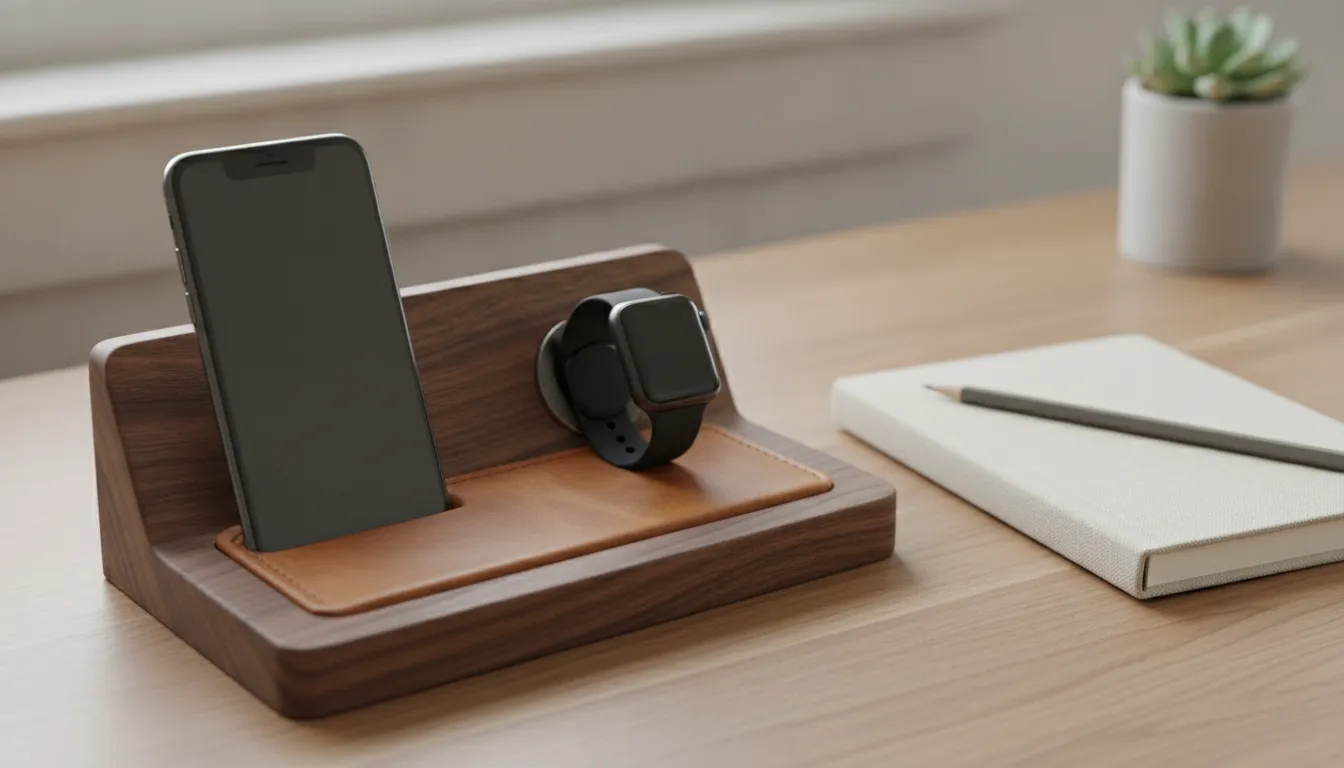
A typical two-device arrangement combines a MagSafe-compatible phone position with a dedicated magnetic connection for Apple Watch. The iPhone settles into the phone position, while the Watch charges beside it. This differs from a general two-device pad that provides two areas without confirming Watch support.
MagSafe alignment is valuable for compatible iPhones because the magnetic connection guides the phone into the intended position. Reliable alignment supports consistent wireless power transfer and keeps the phone stable on the stand. NYTSTND charging stations are designed around MagSafe compatibility for supported iPhone models. Exact output depends on the phone, adapter, and product configuration, so the selected model's live specifications remain the final authority.
Compatibility should be configuration-qualified. NYTSTND's DUO collection is positioned around two-device charging for an iPhone and AirPods or another compatible Qi device. While larger station configurations can provide dedicated positions for an Apple Watch. Do not infer Watch support from the phrase 2 in 1 alone. Match the dock's hardware to the devices used each evening.
Case thickness deserves a practical check. A slim, MagSafe-compatible case may connect as intended, while a thick, heavily textured, or non-magnetic case can weaken alignment. If the phone is used with different cases, compare the product guidance with the setup used most often. The goal is dependable placement without removing the case each evening.
Also consider orientation. An upright phone position can make the clock easy to glance at, while a lower angle may suit a bedside routine better. Neither layout is universally right. Choose the position that matches how the phone is used while charging.
For a broader three-device setup, compare the defined positions in the NYTSTND TRIO collection. That is the more natural direction when an iPhone, Apple Watch, and AirPods all need dedicated charging positions each night.
What materials and design details matter?
Direct answer: The strongest dual docks balance stable proportions, durable materials, clear alignment, and a finish that belongs in the room. Material quality should support daily handling, easy placement, and a lasting visual presence rather than serve as decoration alone.
A charging dock lives in a high-touch location. It is reached for at night, used again in the morning, and handled throughout the day. A solid wood base gives the dock weight and presence without a disposable plastic appearance. NYTSTND stations pair wood bases with leather surfaces to create a stable, tactile object that can remain part of the room after the devices are removed.
Leather has a practical role as well. It creates a considered contact surface for a phone, case, or other device, and it works naturally beside wood, stone, or a clean desktop. A dock should look appropriate when it is not actively charging anything. The materials, texture, and finish should support the room's existing character.
Stability is a functional detail. The base should stay in position when a device is placed or lifted. The charging face should be easy to locate at a glance, and the phone should sit at an angle that supports a simple reach-and-place motion. These details matter more than an elaborate feature list because they determine whether charging feels automatic.
Proportion deserves equal attention. Measure the usable width and depth of the nightstand or desk, then leave enough surrounding space for everyday objects. A base that is too large can make a small surface feel crowded. A base that is too light or narrow may sacrifice stability. The right design gives each charging position enough physical room without adding unused scale.
Finish turns the dock into part of the interior. Wood grain can complement furniture, while leather adds warmth against a modern desktop. Choose a finish that looks intentional from multiple angles. A material-led design can reduce visual noise while preserving the refined feel of the room.
Inspect the points that receive the most contact. Edges should feel comfortable when a device is lifted, surfaces should be easy to dust, and the base should not slide during ordinary use. These observations matter because a charging dock is handled more often than most decorative objects. A polished finish is valuable when it remains easy to live with.
Material choice can also influence placement. A warm wood and leather combination may suit a bedroom or study where the dock remains visible, while a simpler finish may blend into a shared workspace. The best choice is not the most ornate option. It is the one that looks natural beside the furniture and encourages the dock to stay in its intended position.
NYTSTND's charging station craftsmanship guide offers more context on why wood, leather, and construction details matter in a frequently handled object.
How does a 2 in 1 charging dock compare with larger stations?
Direct answer: Choose a 2 in 1 dock for two essential devices and limited surface area. Choose a larger station when three or more devices need dedicated positions in one place. Charging is shared, or separate accessories already take more space than an organized base would.
Capacity should follow the routine, not the largest possible device count. A 2 in 1 charging dock is a focused choice for an iPhone and one companion device. A 3-in-1 station adds another dedicated position. A 4-in-1 station creates a broader charging point for a fuller household setup.
| Setup | Best fit | Typical footprint |
|---|---|---|
| 2-in-1 | Two essential devices | Small and focused |
| 3-in-1 | iPhone, Watch, and AirPods | Moderate with dedicated positions |
| 4-in-1 | Shared or multi-device charging | Larger centralized footprint |
The NYTSTND DUO is positioned for a compact two-device routine. It is a sensible starting point when an iPhone and one additional compatible device are the only items that need a place each night. A smaller station is not a compromise when it matches the actual routine. It preserves useful surface area and avoids paying for positions that remain unused.
TRIO suits a routine that consistently includes three compatible devices. QUAD is better suited to shared charging or a household with several devices that need to be ready in one location. Review the QUAD collection when the charging area serves more than one person or includes an iPad or other USB-C device.
When selecting among DUO, TRIO, and QUAD, count the devices that need simultaneous charging. Do not count every device owned in the household. A larger station earns its footprint when it replaces several separate charging points or solves a repeated conflict over the available position.
There is also a difference between simultaneous need and occasional convenience. If a third device charges only once a week, DUO may remain the more disciplined choice. If that device charges beside the first two every evening, TRIO can make the routine more coherent. This simple distinction keeps capacity decisions grounded in actual use.
When is a 2 in 1 charging dock enough?
Direct answer: Move to a larger station when additional devices regularly compete for the same outlet or surface. A bigger setup earns its footprint when charging is shared, three or more devices need power together, or likely growth creates a real need for additional dedicated capacity.
The key question is not how many Apple devices exist. It is how many need to charge in the same place during the same part of the day. If a Watch or earbuds are frequently moved to make room, the current setup may be undersized. If multiple people bring devices to one kitchen counter or home office, a centralized station can make the routine easier to share.
Growth can matter too. A household may add an Apple Watch, AirPods, or another frequently used device after the initial purchase. Choosing a little capacity ahead of that change can prevent another stand and occupied outlet from entering the room. Still, future-proofing should remain proportional. A large station that displaces lighting, books, or other daily essentials is not an improvement.
Measure the available surface before moving up. Check depth, width, cable exit, and access to the power adapter. Every charging position should have a clear role. TRIO is a natural step for three consistently used devices, while QUAD can create a central place for a broader household routine. The best option is the one that supports repeated use without making the furniture feel overfilled.
For a separate perspective on choosing capacity, read NYTSTND's charging station buying guide. It helps distinguish a genuine need for more positions from the temptation to choose the largest base by default.
What should you check before buying?
Direct answer: Confirm device compatibility, magnetic alignment, footprint, power requirements, materials, safety information, warranty coverage, and the number of positions that will be used every day. These checks connect the dock's specifications to the physical routine it must support.
- Confirm the device layout. Verify that the dock supports the intended iPhone and companion device. Do not assume every dual dock includes the same Watch hardware or charging method.
- Review MagSafe compatibility. Check the supported iPhone generation, case compatibility, and claimed output for the exact configuration. A secure connection matters more than a crowded feature list.
- Measure the surface. Record usable width and depth, including room to place and lift devices comfortably. Check how the cable reaches the outlet without crossing the main work area.
- Assess construction. Look for a stable base, durable contact surfaces, and a finish that works with the surrounding furniture. Wood and leather can make a frequently handled object feel considered and lasting.
- Review power and safety details. Confirm included accessories, required adapter specifications, and stated protections. Follow the manufacturer's instructions and keep the dock on a clear, dry surface.
- Consider the next device. Stay with DUO when two positions meet the daily need. Consider TRIO or QUAD when a third device, shared use, or likely growth creates a real need for additional capacity.
It is also worth considering how the dock fits the wider room. A charging point beside the bed should support a sleep-friendly evening routine. A desk dock should preserve a clear work surface. NYTSTND's article on desk charging station ideas explores how placement and visual order can work together.
Find the right NYTSTND charging setup for the devices and space you use every day.
Frequently Asked Questions
Direct answer: The right dual dock is a compact, compatible charging solution for two devices, with enough stability and capacity for the intended routine. The most important decisions are device fit, charging hardware, available surface area, and whether two positions will remain sufficient.
Can a 2 in 1 charging dock charge an iPhone and Apple Watch?
Yes, when the dock includes a MagSafe-compatible iPhone position and the required Apple Watch charging hardware. Confirm the exact model support and configuration before ordering, because the phrase 2 in 1 does not guarantee a Watch position.
Is every 2 in 1 dock MagSafe compatible?
No. Some dual docks use different wireless standards or layouts. Check the product specifications for MagSafe compatibility, supported iPhone models, case guidance, and expected output before selecting a dock for a specific phone.
Does a 2 in 1 charging dock save nightstand space?
Yes. Combining two charging functions in one stand creates a more focused footprint than separate accessories and leaves room for other essentials. Measure the usable surface and clearance around the dock before choosing a location.
Should I choose DUO, TRIO, or QUAD?
Choose DUO for two essential devices, TRIO when three compatible devices need dedicated positions. And QUAD when charging is shared or a broader device routine needs one central station. Let simultaneous daily use determine the size.
What materials make a charging dock a good long-term choice?
A stable base, durable contact surface, and well-finished wood and leather construction can support daily handling while helping the dock belong in a refined room. The finish should also be easy to place, lift, and maintain.
Previous article


