


The Best Multi-Device Charging Stations That Actually Fit an iPad

Most multi-device charging stations are designed for small phones but struggle to support the weight and size of an iPad Pro. These units often tip over when you dock a larger device. A premium station solves this with a weighted base and materials that blend into your home.
Explore the Premium NYTSTND Charging Station Collection
The best multi-device charging stations provide a centralized, reliable power hub for your daily electronics while offering the structural integrity required to support an iPad safely. By integrating premium materials like hand-finished hardwood and full-grain leather with a heavily weighted base, these chargers prevent larger tablets from tipping. NYTSTND crafts these docks to organize your desktop, eliminating aesthetic distractions and keeping up to four Apple devices powered simultaneously.
Choosing a multi-device docking station requires looking past simple port counts. It demands a design that prioritizes balanced physical support, high-power output, and timeless aesthetics. To find the ideal fit, we must first examine why standard consumer charging stations fall short for larger tablets.
Why Do Most Multi-Device Chargers Fall Short for iPads?
Most multi-device chargers fall short for iPads because they lack the physical backrest support and weighted base required to hold a large tablet upright. This leads to tipping, port strain, and loose cables. Premium charging stations solve this with solid wood or metal frames that keep iPads secure.
The search for premium multi-device charging stations often leads to disappointment for tablet users. While many charging hubs claim to support multiple devices, they are structurally engineered for compact items like smartphones and smartwatches. When a heavier device like an iPad is introduced, standard consumer docks struggle to maintain balance.
Lack of physical support
Generic charging docks are typically equipped with shallow slots or low backrests designed to lean a smartphone. An iPad possesses a significantly wider surface area and a higher center of gravity. Without an elevated, reinforced backrest, the tablet cannot remain upright. This structural deficiency forces users to lay their tablets flat across the desk, defeating the purpose of a centralized organizer. To choose the right setup, you can read our iPad charging station buying guide.
Weight and balance issues
A modern iPad can weigh upwards of one pound. Light plastic or aluminum docks from standard tech brands are easily destabilized by this weight. Docking a tablet can cause the entire charging hub to tip backward or slide across the desk. This has led many design-conscious professionals to seek out a heavy, multi-device charging tray that offers a secure and stable footprint.
The cord and port problem
Many standard multi-device docks do not provide a dedicated high-power port for tablets. While they may offer wireless coils for a phone and watch, they leave the tablet out, requiring a separate wall adapter and trailing cables. A premium charging station integrates all charging elements into a single, high-output power source, eliminating the need to search for additional parts.
What Should You Look For in the Best Multi-Device Charging Stations?
To find the best multi-device charging station, look for a heavy base to prevent tipping, a dedicated reinforced backrest for tablets. Integrated MagSafe compatibility for quick alignment, and premium materials like natural hardwood and full-grain leather to complement your space while protecting your devices from scratches.
Selecting the ideal multi-device charging hub involves looking beyond basic technical specifications. It requires choosing a station that matches the high build quality of your devices while offering stable, long-term utility.
Sturdy builds for large devices
To support a larger screen, a premium station employs a solid, reinforced backrest. This structural support prevents any flexing or tipping when you interact with the touch screen. A heavily weighted base ensures the station remains anchored, allowing for effortless, one-handed docking and undocking of your devices.
Fast charging with MagSafe
Modern multi-device charging hubs incorporate MagSafe technology for seamless phone docking. MagSafe utilizes a precise ring of magnets to automatically align your phone over the wireless charging coil. This eliminates the common issue of legacy charging pads where a slightly misaligned phone fails to charge overnight.
Real wood and leather finishes
A charging station is a permanent fixture on your desk or nightstand, so its material composition matters. Handcrafted stations featuring premium hardwoods like walnut or oak and full-grain leather offer a level of refinement that plastic cannot achieve. These natural materials are highly durable and develop a beautiful patina over time, as supported by electrical safety guidelines outlined by the U.S. Consumer Product Safety Commission (CPSC).
How Does the NYTSTND QUAD Securely Support and Charge an iPad?
The NYTSTND QUAD securely supports and charges an iPad by using a thick, handcrafted wood backrest and a weighted base that prevent tipping. With its integrated charging port and dedicated space, the QUAD powers up to four Apple devices simultaneously, keeping your nightstand organized and clutter-free.
While standard multi-device stands are limited to a phone and watch, the NYTSTND QUAD is engineered specifically for extensive setups that include an iPad. It provides a heavy, beautifully crafted wooden dock that accommodates four devices at once, bringing clean organization to your professional workspace or bedside.
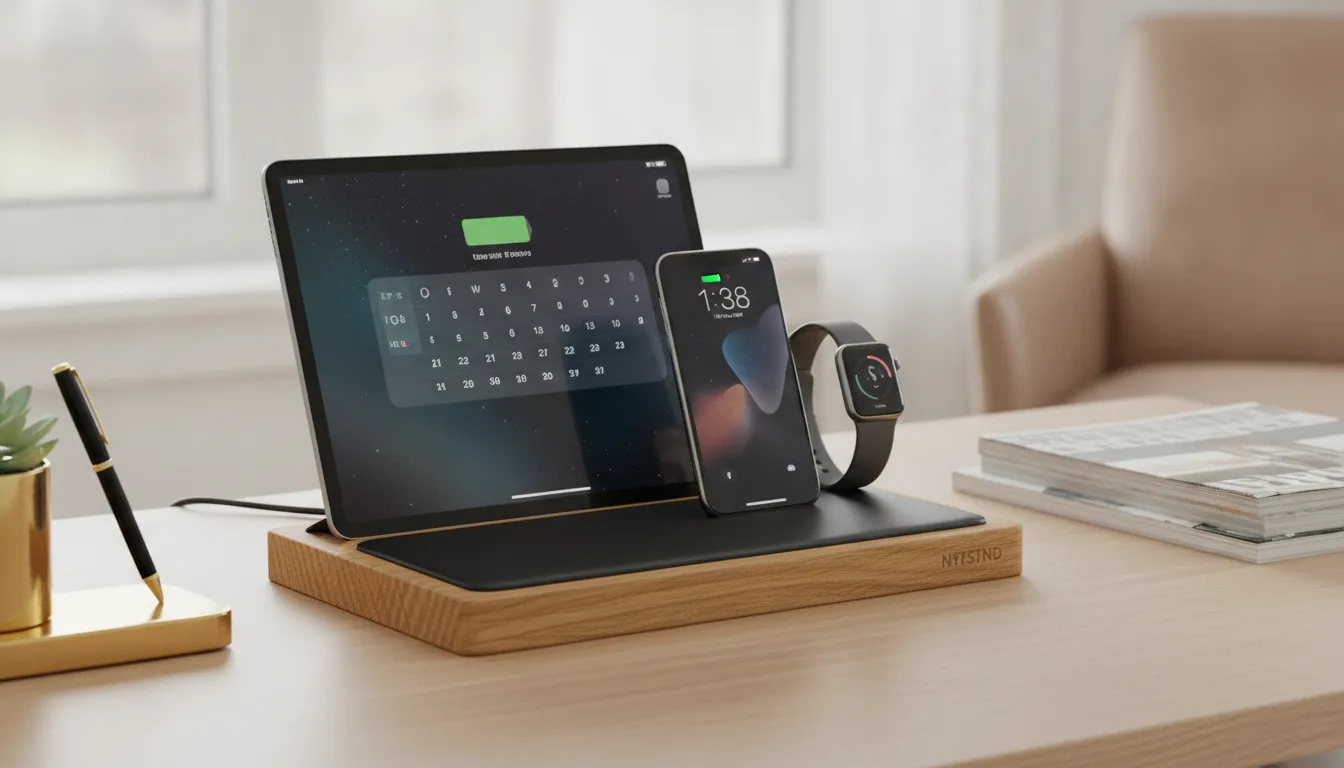
A reinforced backrest for your tablet
The QUAD features a thick wooden backrest that is structurally capable of supporting an iPad Pro or iPad Air without flexing. This keeps your screen positioned at an optimal viewing angle, allowing you to check messages or monitor tasks while charging. Having a designated, secure spot for your tablet reduces the risk of accidental drops or knocks.
High-end wood and leather craftsmanship
NYTSTND avoids cheap synthetics, crafting each QUAD from solid oak or walnut, paired with a soft full-grain leather top. This combination provides a sophisticated aesthetic while protecting the glass and metal surfaces of your Apple devices from scratches. Beyond aesthetics, keeping your workspace organized has a direct impact on mental clarity and rest. Research published in the journal Sleep indicates that organized, clutter-free bedrooms promote a more relaxing sleep environment by reducing stress. To see reviews of top options, explore the best iPad charging dock stations on our journal.
How to set up the QUAD charging dock
Setting up your multi-device dock is straightforward. Follow these steps to organize your workspace:
- Connect the provided high-power adapter to a wall outlet. This single cable powers all four charging spots.
- Place your iPad securely against the solid wood backrest, connecting it to the integrated port.
- Snap your iPhone onto the integrated MagSafe mount for an aligned, magnetic fast charge.
- Set your AirPods in the designated leather-lined tray in the center of the station.
- Attach your Apple Watch to the side magnetic post, keeping it visible for nightstand mode.
Category Evolution: MagSafe vs. Legacy Charging Pads
The evolution from legacy Qi charging pads to MagSafe represents a major upgrade in efficiency and usability. While old pads required precise manual placement and suffered from heat loss. MagSafe uses built-in magnets to auto-align devices for a perfect coil-to-coil connection and faster, safer wireless charging.
Wireless charging technology has matured beyond generic plastic pads. The shift from basic Qi charging to magnetic alignment systems represents a significant evolution in usability, speed, and premium build quality.
Magnets and optimal power flow
Legacy Qi pads suffered from a major alignment flaw: a phone placed slightly off-center would charge incredibly slowly or not at all. Furthermore, a late-night notification vibration could drift the phone off the coil, leaving you with a dead battery in the morning. MagSafe resolves this by utilizing an array of aligned magnets to pull the device into the exact position required for an optimal charge. Minimizing heat loss and maximizing power efficiency.
Premium materials vs. basic plastic
Early charging pads were lightweight, plastic gadgets that felt cheap and moved easily. Modern charging stations use heavy, organic materials like natural wood and premium leather to stay anchored. This shift transforms a technical accessory into a functional piece of home decor, ensuring your nightstand remains clean and elegant.
| Feature. | Legacy Qi Pads. | MagSafe Stations. |
|---|---|---|
| Device Alignment. | Manual placement needed. | Magnetic auto-alignment. |
| Power Efficiency. | High energy loss as heat. | Direct, optimized coil link. |
| Material Quality. | Lightweight synthetic plastic. | Premium hardwood and leather. |
| Capacity. | Charges a single device. | Charges up to four devices. |
Organizing Your Desk and Bedside for a Sleep-Friendly Space
Organizing your desk and bedside with natural materials reduces visual noise and creates a sleep-friendly space. Replacing chaotic cable clutter with a single, elegant wood and leather charging station helps calm your mind. Lower daily cognitive load, and establish a relaxing, clutter-free environment that supports better rest.
Your physical environment has a direct influence on focus and mental clarity. A nightstand cluttered with multiple charging blocks and tangled cables creates aesthetic distraction that can hinder relaxation. By replacing plastic docks with premium wood and leather, you can cultivate a much calmer setting.

Reducing visual distractions with natural elements
Tangled cables and bright synthetic accessories introduce visual clutter to your room. Wood and leather charging stations integrate naturally with home decor, behaving like fine furniture rather than technical gadgets. This organic styling softens your environment and helps transition your mind into a restful state before sleep.
Structuring a productive workspace
An organized workspace is equally critical for daytime productivity. Giving your phone, watch, and tablet dedicated charging docks saves time and ensures your gear is always ready. Utilizing a premium charging tray on your desk promotes a streamlined aesthetic that keeps you focused on your work throughout the day.
Order Your Handcrafted NYTSTND QUAD Charging Station Today
Frequently Asked Questions
Does an iPad support wireless charging on a charging pad?
No, iPads do not currently support wireless charging through a Qi or MagSafe pad. They must be powered using a physical cable or an integrated port. Some charging stations solve this by building a dedicated high-power connector directly into the frame. According to Apple Support, utilizing high-wattage power supplies ensures that large-battery devices like iPads charge efficiently, which is why a centralized, high-output dock is the most effective solution.
How much power is needed for a multi-device charging station with an iPad?
A station designed to power multiple devices alongside a tablet requires a powerful energy source. Typically, you need at least a 30W to 45W wall adapter to supply enough current for an iPad, phone, and watch simultaneously. Underpowered stations will cause your iPad to charge very slowly or stall completely. A single, high-wattage power source keeps your bedside neat and ensures every device receives a full charge.
Will an iPad with a case fit on a multi-device charging station?
Most premium multi-device charging stations are designed to accommodate standard slim plastic or leather covers. However, highly ruggedized or extremely thick utility cases may prevent a proper connection with the integrated connector. It is recommended to check the depth of the charging slot before purchase. Handcrafted stations often utilize open-back designs that offer greater compatibility than cheap, enclosed docks.
What is the benefit of a weighted charging station for iPads?
A weighted base is critical for any stand holding a large tablet. An iPad has a high center of gravity that can easily tip over lightweight plastic stands when docked. A station constructed from solid hardwood or heavy metal alloy remains firmly anchored to your desk. Allowing you to safely dock and undock your tablet with one hand without the station sliding.
Ready to Organize Your Workspace With a Premium Charging Tray?
A desk covered in loose cables introduces unnecessary clutter into your professional environment. This visual clutter can increase daily cognitive load, making it harder to focus or unwind. Handcrafted wooden charging stations solve this by providing a dedicated, elegant home for all of your devices. Transitioning to a premium charging hub streamlines your daily routine, ensuring your phone, watch, and tablet are always charged and ready. Elevate your workspace and bedroom with a clean, functional design that supports both productivity and relaxation.
Ready to contact our team? Call (646) 346-9521 to discuss custom finishes or explore premium charging stations at NYTSTND.
Previous article


