


iPad Charging Station Buying Guide

An iPad left beside a knot of charging cables is not an organized workspace. The right station gives every Apple device a deliberate place to rest and recharge.
Shop NYTSTND Apple charging stations to create a cleaner home for your iPad, iPhone, Apple Watch, and AirPods.
An ipad charging station is a dedicated dock or organizer that powers an iPad while keeping it stable, accessible, and grouped with nearby Apple devices. The right model fits your iPad and case, provides the correct connector and power, manages cables, and accommodates the other devices you use daily. Compare build quality, footprint, safety, materials, and ease of use rather than choosing on charging speed alone. Heat also matters because Apple notes that a battery warms as it charges, which can reduce its lifespan. This guide explains personal docks, multi-device stations, and larger storage systems, helping you choose a refined setup that keeps your Apple ecosystem charged and neatly organized.
Buying well means deciding whether you need a simple iPad dock or a central home for several devices on your desk or nightstand. Before comparing power, compatibility, materials, and placement, answer the first question: What is an ipad charging station?
What is an ipad charging station?
An ipad charging station is a dedicated place to charge and store an iPad while keeping nearby devices organized. The best setup supports the tablet securely, routes the cable cleanly, and gives your iPhone, Apple Watch, and AirPods their own predictable charging spots.
An iPad charging station is a fixed home for powering and storing an iPad. It keeps the tablet upright or within reach while reducing loose cables across a desk or nightstand. Some stations serve only the tablet, while others organize several Apple devices in one defined space.
The term describes a setup, not one universal charging method. Many stations power the iPad through a USB-C cable, then charge an iPhone, Apple Watch, and AirPods wirelessly. Do not assume an iPad can use the same wireless charging pad as an iPhone. Check the exact iPad model and station design before buying.
Chargers, stands, docks, and stations
A loose USB-C charger supplies power, but it does not hold or organize the tablet. A stand supports a useful viewing angle, yet it may provide no power at all. A dock adds a physical connection and may also connect displays, storage, or other accessories.
An iPad charging station brings placement, cable control, and daily charging into one routine. A multi-device wireless charger has a wider role, but its flat charging areas may only suit smaller devices. For an Apple-focused space, the best setup often combines wired iPad power with dedicated wireless spots.
That mixed approach can keep every device visible without turning the desk into a row of adapters. A thoughtful Apple desk charging setup also gives each item a clear place when work ends.
What should a station support?
Start with compatibility, because the station must fit the iPad's size, weight, case, and charging port. Confirm whether the tablet remains stable in both portrait and landscape positions. Then check that the cable reaches cleanly without bending sharply at the connector.
Next, match the station to the other Apple devices you use each day. Count the required charging spots, then check their fit for your iPhone, Apple Watch, and AirPods case. Look for clear power details and built-in heat protection rather than relying on a broad compatibility label.
Charging habits also matter when an iPad stays on the station for long periods. Apple says iPad automatically stops charging when full, so overnight charging is safe. Supported models can also use an 80 percent charge limit to help reduce battery wear.
The right fit for the space
A station earns its space when it makes charging easier and keeps the room calm. For a fixed desk or bedside setup, favor a solid base, simple cable routing, and materials that suit the room. For travel, a lighter stand and separate charger may be more practical.
Think beyond power alone. A well-planned station should let you place each device quickly, see its charging state, and pick it up without moving the others. These minimalist Apple charging station layout ideas show how placement can reduce clutter. The right choice supports your actual devices and habits, not the largest feature list.
How to choose the best ipad charging station for your space
Choose the best ipad charging station by matching the station to your iPad model, case, cable, other Apple devices, and room layout. Prioritize secure support, cable routing, safe airflow, and premium materials before comparing extra ports or decorative features.
The best iPad charging station matches your devices, daily routine, and available surface. Start by listing every device that will charge there. Then note each connector, case, cable, and charging accessory you already use. This simple check prevents a neat-looking station from becoming another source of loose cords.
Device and power compatibility
Treat the iPad as the anchor device because its size and wired charging needs shape the setup. Confirm that the stand supports its weight and fits its case. Also check that the USB-C cable can reach the port without bending sharply or crossing the surface.
Next, plan places for the rest of your Apple devices. An iPhone may use a MagSafe or Qi charging spot, while an Apple Watch needs puck support. AirPods may charge on a wireless pad or by cable. A NYTSTND Apple charging station should make each device easy to place and remove.
Check the included power adapter and every output before buying. The station should meet the needs of all connected devices at the same time. Avoid assuming that several ports always deliver equal power. Also confirm whether the iPad cable and Apple Watch puck are included or must be added.
| Factor. | Single-user space. | Shared charging zone. |
|---|
Cable control and charging safety
Good cable management starts behind the station, not on top of it. Look for channels, pass-throughs, or a base that hides extra cable length. Keep the main power lead away from walkways and drawer paths. For more layout ideas, see this guide to a minimalist Apple charging station layout.
Safety matters when devices stay connected for hours. Choose a stable station that does not tip when you remove the iPad. Check for overheating protection and foreign object detection when those features are listed. Keep charging surfaces clear so keys or other loose items do not sit on wireless pads.
Heat also deserves attention. Apple notes that a battery warms while charging, and heat can reduce its lifespan. The iPad reduces charging current as it nears full charge to limit this effect. Review Apple's iPad battery guidance, then place the station where air can move around it.
The right fit for each room
A nightstand calls for a small footprint, quiet cable routing, and simple one-handed use in low light. A desk needs clear screen access and enough room for work tools. On a kitchen counter, favor a stable base and a surface that is easy to keep clean.
A family charging zone needs a different plan. Give each device a clear home, leave space for larger cases, and keep cables fixed in place. Real wood and full-grain leather can make a station feel at home with furniture. Whatever the material, inspect the finish, base grip, and build quality before buying.
Measure the intended surface before choosing. Include space for device overhang, cable bends, and comfortable removal. The right station should organize the whole charging routine without taking over the room. If it forces devices into tight slots or blocks nearby items, choose a simpler layout.
Match your charging station to the devices you use every day
A charging station works best when it reflects the exact Apple devices used every day. Count the iPad first, then add iPhone, Apple Watch, AirPods, and shared household devices so the final setup has enough room without adding unused charging spots.
The right iPad charging station starts with a simple count. List every device that needs a home, then note where each one charges. Include the iPad, iPhone, Apple Watch, AirPods, and any second phone used by someone else.
A five-step device check
Use this quick check before choosing a station. It helps prevent an undersized setup today or an unused charging spot later.
- Start with the iPad. A single-iPad setup needs a stable place for the tablet, its case, and the correct cable.
- Add the iPhone. For an iPad and iPhone, choose two clear device positions and keep each charging method easy to reach.
- Count the full Apple ecosystem. Add Apple Watch and AirPods if they also need a nightly home near the iPad.
- Plan for the household. Add shared phones or earbuds, then assign each person a consistent spot to reduce mix-ups.
- Build a travel version. Pack only the charging gear needed for the devices that leave home with you.
For a desk, give the iPad enough room to sit safely without blocking the devices beside it. A clear layout also makes the tablet easy to grab between calls. These organized desk charging setup ideas can help you map the space before buying.
Capacity for one user or a household
A single user can often plan around one daily routine. If you use only an iPad, avoid paying for charging spots that will stay empty. If an iPhone joins the routine, place both devices where their screens and cables will not compete for space.
A full Apple setup needs more room and a clear place for every item. Compare your device count with the charging spots available, then leave room for the device you may add next.
Home base and travel kit
Your home station should handle the devices used every day. A travel kit should be smaller and easy to check before leaving. Keep travel cables and adapters together, so taking them does not break the setup at home.
Charging habits also matter when an iPad spends long periods at its home base. Apple says supported models can use an 80% charge limit to help reduce battery wear. Choose a setup that keeps the iPad cool, visible, and simple to disconnect when needed.
Before buying, test the plan with the cases and cables you already use. Make sure the iPad rests securely and every device remains easy to reach. The best capacity is not the largest one; it is the one that matches your real routine.
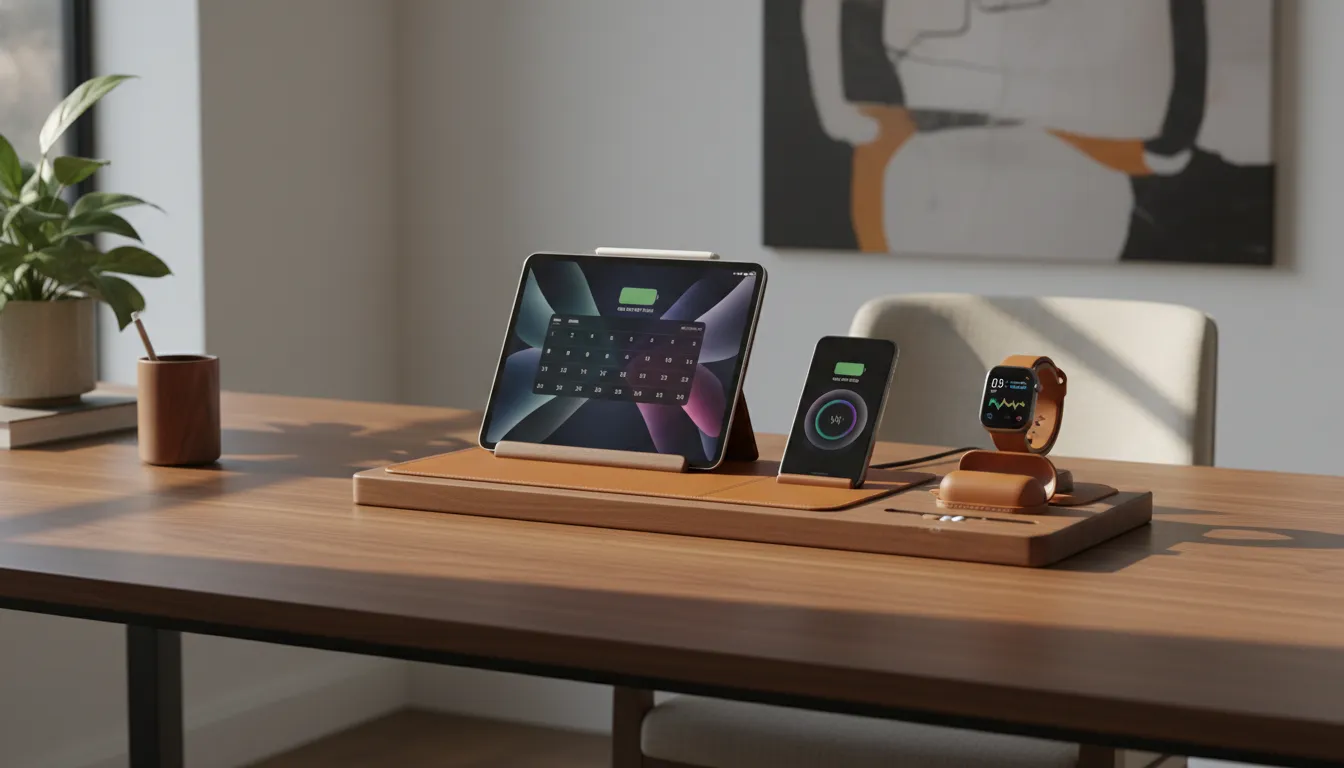
Can you charge an iPad on a charging station?
Yes, you can charge an iPad on a charging station when the station includes or accommodates the right wired power connection. Most iPads use USB-C or Lightning, so confirm the cable path, power output, and physical support instead of assuming wireless charging will work.
Yes, you can charge an iPad on a charging station when the setup provides a suitable wired power connection. Most iPads charge through a USB-C or Lightning cable, based on the model. Do not assume an iPad will charge on the station's wireless pad.
How iPad charging works
An iPad charging station needs a cable, a power source, and a connector that fits the tablet. Check your iPad model before choosing the cable and power adapter. The right setup should keep the port easy to reach while giving the tablet firm support.
The tablet may remain connected after reaching full charge. Apple says the iPad stops charging when its battery is full, so overnight charging is safe. Still, keep the device and charger uncovered so heat can escape.
The station's role
A home station can serve two jobs at once. It can hold the iPad near its wired cable while charging an iPhone, Apple Watch, or AirPods on compatible wireless spots. This creates one clear home for the devices without implying that the iPad itself supports MagSafe charging.
That approach works well on a desk or nightstand where several Apple devices gather each day. A thoughtful minimalist cable-free desk layout also keeps the tablet visible and ready without leaving loose cords across the surface. It also makes each device easier to find before work, travel, or bedtime.
What to check before charging
Start with fit. The station should support the iPad's size and weight without blocking its port. Then confirm that the wired power source suits the tablet and that every wireless area matches the other devices placed there.
- Match the cable connector to your exact iPad model.
- Choose a stable stand or resting place for the tablet.
- Keep the cable path short, neat, and free from strain.
- Reserve wireless spots for devices that support them.
- Leave space around the iPad and charger for airflow.
Why materials and cable management matter
Materials and cable management matter because a charging station remains visible even when devices are not charging. Real wood, full-grain leather, stable construction, and hidden cable paths make the setup feel intentional instead of temporary or cluttered.
An iPad charging station stays in view long after charging ends. Its finish, shape, and cord layout affect how a desk or nightstand looks each day. Premium shoppers should judge it as both a useful tool and a lasting part of the room.
Materials that belong in the room
Real wood brings natural grain and warmth that molded plastic cannot copy. Full-grain leather adds a soft touch where devices rest. Together, these materials help charging gear blend with furniture instead of looking like another piece of office hardware.
Look closely at joints, edges, and contact points before buying. A solid build should sit flat and resist shifting when you connect or remove an iPad. Smooth device rests also help keep a careful setup from looking worn or untidy.
NYTSTND uses handcrafted real wood and full-grain leather in its charging stations. That material-led approach makes a premium Apple device charging station feel at home beside wood furniture, leather desk goods, and other lasting pieces.
Hidden cables, calmer surfaces
Cable management matters because a neat station can still look messy when several cords spill across the surface. Check where the power lead exits and whether extra cable can stay behind the furniture. A clear route also makes dusting and daily device use easier.
At a nightstand, place the station near power without stretching a cable across the floor. On a desk, keep the lead away from the work area and any moving chair parts. These choices support a clean nightstand charging layout without hiding the devices themselves.
Durability beyond the surface
Good materials matter most when the full design supports regular use. Check that the base stays firm, the device position feels secure, and charging parts have room to release heat. Apple notes that an iPad battery warms while charging, and heat can reduce its lifespan. The device lowers charging current near full charge to limit that effect.
That guidance makes open space and a stable device position worth considering. See Apple's iPad battery guidance for details on charging heat and battery care. Then choose a station whose material, structure, and cord path can keep the setup orderly through years of daily use.
Where should you put an iPad charging station?
Place an iPad charging station where the tablet naturally rests: a desk, nightstand, entry console, or family command center. The best location has a nearby outlet, a stable surface, open airflow, and enough clearance to remove the device without disturbing other chargers.
The best place for an iPad charging station is where the tablet naturally ends each day. That spot should have a nearby outlet, enough open space, and a stable surface. It should also keep the iPad easy to reach without placing cables across a walkway.
Nightstand or desk
A nightstand works well when you use the iPad for reading, alarms, or evening entertainment. Keep the station away from bedding and direct heat. Apple explains that heat during charging can shorten battery life, so give the device open space around the dock.
Overnight charging is practical for a bedside setup. The iPad stops charging when its battery is full, according to Apple's iPad battery guidance. Place the screen where notifications will not disturb sleep, and route the power cable behind the furniture.
A desk is often better for an iPad used as a second screen, note-taking tool, or video-call device. Put the station within arm's reach but outside the main writing area. An iPad charging station for your desk can also give your iPhone, AirPods, and Apple Watch one clear home.
Shared spaces at home
An entryway station creates a simple drop zone for devices carried between home, school, and work. Choose a console with enough depth for the iPad and its case. Keep keys, bags, and loose metal items in a separate tray to protect the charging area.
The kitchen can work when the iPad supports recipes, calendars, or family planning. Set the station far from the sink, stove, and food prep zone. A family command center near the kitchen may offer the same convenience with less risk from water, heat, and spills.
Shared spaces need clear rules. Decide which devices belong at the station, who uses each port, and when the iPad should return. A organized Apple device setup can reduce loose cables while keeping the household's daily devices easy to find.
Travel and buying questions
Before buying, ask where the station will stay most days. Measure that surface, then check space for the iPad's size, case, cable, and viewing angle.
- Is the outlet close enough to keep the power cable off the floor?
- Will the iPad fit securely while its case stays on?
- Does the spot stay clear of heat, water, bedding, and busy edges?
- Will a fixed station or a portable option better match the daily routine?
- Can the setup hold every device without adding loose charging cables?
Also consider when the iPad needs to be ready. A bedside station supports morning use, while an entryway station supports departures. A desk station suits work hours, and a shared command center makes charging visible to the whole household.
Common mistakes to avoid before you buy
The biggest buying mistakes are assuming every Apple device charges the same way, ignoring case fit. Choosing too few or too many charging spots, and overlooking heat or cable strain. A simple device checklist prevents most of these problems before purchase.
A useful iPad charging station starts with a clear list of devices, cables, and daily charging habits. Check every device before comparing finishes or features so the station fits your Apple setup and the room where it will stay.
Assuming every device charges the same way
Do not assume an iPad will charge on the same wireless pad used for an iPhone or AirPods case. Confirm how each device receives power, then check the station's supported connections. Include the exact iPad model, case, cable port, iPhone, Apple Watch, and AirPods case in your review.
Apple Watch and AirPods support can also vary by model and case. A pad may fit one device yet leave another without a useful charging spot. If the iPad uses a wired connection, confirm that the stand leaves enough room for the plug. A case should not force the cable into a sharp bend.
- List every device that will use the station.
- Note whether each device needs a cable, pad, or watch charger.
- Check whether cases affect fit or charging contact.
- Confirm that the iPad stays stable while connected.
Ignoring power, cables, and slot count
A station is only part of the power path. Check whether it includes the needed power adapter and cables, or whether you must supply them. Match each cable and adapter to the station's stated needs. This step helps prevent a tidy setup from becoming a mix of extra cords and adapters.
Heat also matters when choosing where the station will sit. Apple notes that a battery warms as it charges, and heat can reduce its life. Its iPad battery guidance explains that charging current drops as the battery nears full charge. Keep the station open to airflow rather than tucked under papers or bedding.
More slots are not always better. Count what you charge together on a normal day, not every device you might own later. An oversized station takes more space and can leave empty areas that collect clutter. For a balanced layout, review ideas for a clutter-free charging ideas before choosing capacity.
Choosing weak materials or the wrong look
A charging station stays in view, so build quality affects both use and appearance. Thin, light materials may shift when you lift an iPad or pull a cable. Look for a stable base, smooth contact points, and surfaces that suit repeated daily use. Check product dimensions against the exact space before buying.
Do not treat color and material as an afterthought. A station that clashes with the desk or nightstand can make the room feel less ordered. Compare its finish with nearby wood, leather, metal, and other accessories. A premium Apple device charging station should organize the whole Apple setup without looking like loose hardware.
Finally, picture the full routine before purchase. Make sure you can place and remove each device without moving the others. Check that screens remain useful when needed and cables stay out of walkways. This simple test reveals poor fit, excess capacity, and awkward placement before they become daily problems.
Frequently Asked Questions
Can you charge an iPad on a charging station?
Yes, an iPad can charge on a station that provides a compatible wired connection and enough power for the specific model. Many home stations hold the iPad while a cable supplies power. Before buying, confirm the connector type, case clearance, stand stability, and available output when every connected device charges at once.
What is the best charging station for iPad and iPhone?
The best charging station for an iPad and iPhone fits both devices securely and provides compatible charging connections for each. Look for stable support for the iPad's size and weight, enough total power for simultaneous charging, and room for cases. A multi-device station can also organize an Apple Watch and AirPods without adding separate cables across the desk.
Is there any way to charge an iPad without a charger?
An iPad still needs a power source, but it may not require its original wall charger. A compatible powered USB port, power bank, or charging station can supply power through the correct cable. Check that the source supports the iPad model and provides suitable output. An unpowered stand can hold the tablet, but it cannot charge it.
Is it better to keep an iPad plugged in or use the battery?
Either approach is safe during normal use, because the iPad stops charging when its battery is full. However, heat and charging patterns affect battery aging over time. Apple says iPad batteries are designed to retain 80 percent of original capacity after 1,000 complete charge cycles. On supported models, an 80 percent charge limit can reduce wear during long periods on a station.
Ready to organize your Apple charging setup?
Waiting to improve your charging area means more days spent managing loose cables, scattered devices, and a setup that does not serve your routine. Choosing a better station now gives you time to create a cleaner, calmer place before cable clutter becomes an everyday frustration. Start with the devices you charge most often, then choose a station that keeps your Apple ecosystem organized and ready each day.
Ready to give every device a clear place? Explore materials, sizes, and layouts today, so you can choose a lasting setup without rushing later. Shop premium Apple ecosystem charging stations to compare your options, and contact NYTSTND if you need help matching a station to your routine.
Previous article

Next article


